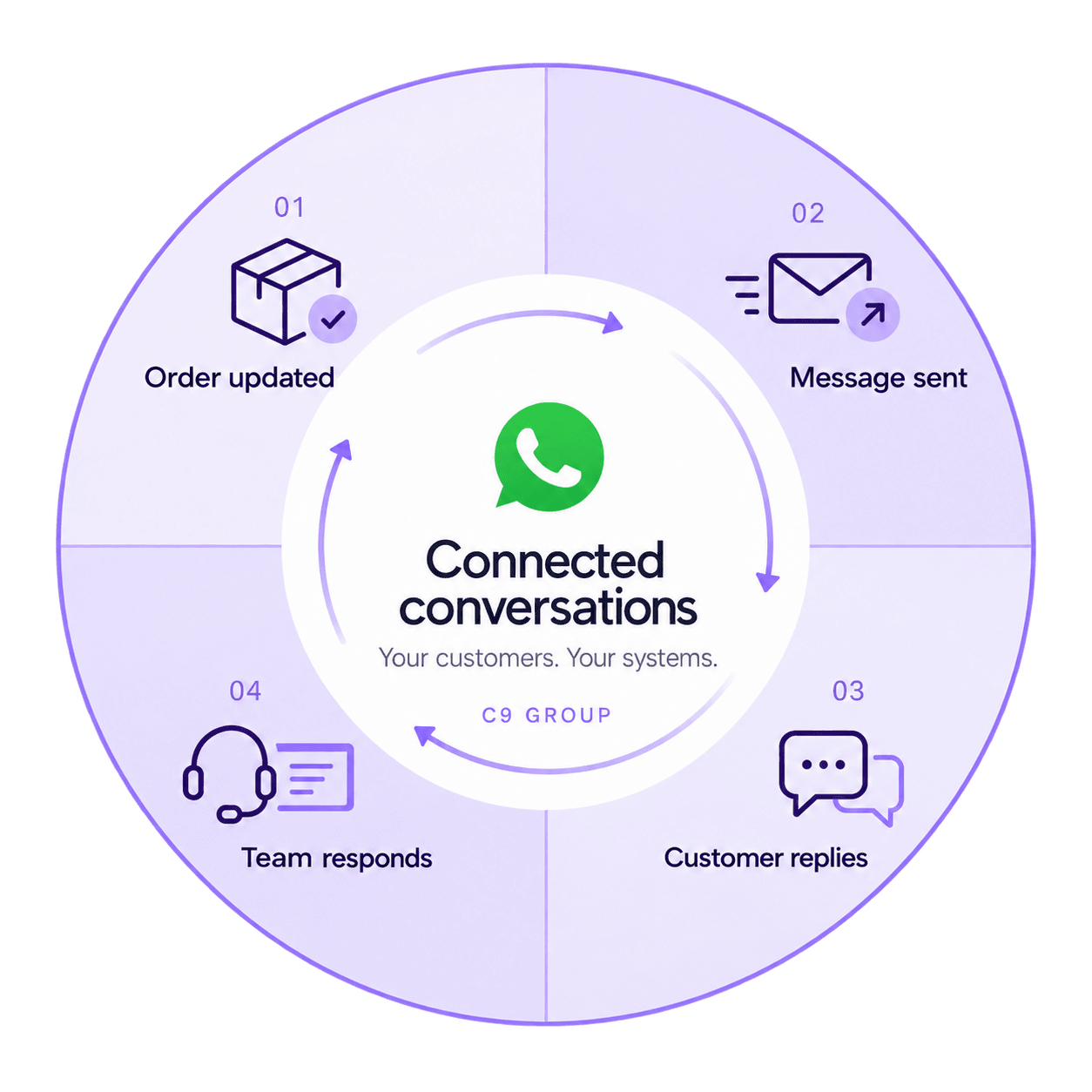
01
Order updates
An order is ready to collect.
EXAMPLE
Your order is ready to collect.
Thanks. Can I collect tomorrow?
Let the connected team handle the next question.

Buy standalone WhatsApp Business API access from C9. Customers message you in WhatsApp; staff read and answer in a connected business application. You’ll need to arrange that application and its integration alongside API access.
Example WhatsApp conversation handled in a connected application.
Business: Hi Mia, your order is ready to collect.
Customer: Thanks. Can I collect tomorrow?
Business: Of course. We’re open from 9 am. See you then!
Plan both sides of the exchange: the update your customer receives and where their response will go.
An order is ready to collect.
Your order is ready to collect.
Thanks. Can I collect tomorrow?
Let the connected team handle the next question.

A booking is approaching.
Hi Alex, your appointment is tomorrow at 10:30 am.
Where should I park?
Give customers a way to ask for useful details.

A customer is weighing up a purchase.
Do you have this chair in blue?
Yes. I can send a photo of the fabric.
Add context with supported media through your application.
A customer has an open enquiry.
We have an update on your service request.
Great. What happens next?
Keep the conversation connected to the original request.
Match the connection to the way you work. Availability depends on the selected service, destination or account, and the software connected to it.
Use approved templates when required for business-initiated messages. Content and category rules apply.
Give an enquiry more context with supported media. Available formats and limits depend on the connection and application.
Supported buttons or lists give customers a clear next step, such as choosing an option. Available message types depend on your connection and application.
Route incoming messages to a connected application. Your team or configured workflow needs to handle the response.
Pass supported status events to your system to help your team follow the conversation. Read information is not always available and does not guarantee a response.
Your integration can associate messages with the right order or customer record. That workflow requires application configuration.
C9 supplies the WhatsApp API connection. Your business application provides the workspace where staff read and answer messages.

Buy WhatsApp Business API access independently of other C9 services. Account and number eligibility must be assessed for the connection.
Arrange the inbox or business application your staff will use. Choose it around reply handling and team access; API access does not include a staff-facing tool.
Business and number details, recipient permissions, content and access to a compatible application. Agree who connects it and handles replies.
Need help connecting it? Include that in your enquiry. Confirm whether C9 can quote for the work or whether you need your software provider or developer before ordering API access.
C9 supplies API access. Your business provides message content, recipient permissions and someone to own the workflow. Software configuration, testing and maintenance need an assigned application provider or developer; any work you ask C9 to perform must be agreed in the quote.
Before activation, agree the contact and coverage for API service issues, who fixes the software connection and who reviews failed messages or unanswered replies. API access alone does not include ongoing workflow management.
Budget for messaging usage, any applicable C9 service or account fees, and the application and integration your team needs. Ask for one-off and recurring charges to be identified separately.
Choose your first use case, such as a booking confirmation, then identify the software that will hold customer details. You can enquire before you have an application or developer.
Tell us which booking, order or customer system you use and what should trigger a message. An existing connector may help; a custom connection may need a developer.
Plan which location appears in each message, where replies go and who owns the customer record. Include your existing sites when defining the connection.
A practical guide to choosing your channel, understanding the setup and preparing for a quote.
Account, number and messaging requirements depend on the selected onboarding route. Prepare the essentials before making changes to an existing setup.
Existing-number use, migration and account or template approvals need assessment. Do not remove an existing WhatsApp setup until the agreed onboarding steps are confirmed.
Your business provides account access and business details. Agree who creates or connects the required WhatsApp Business Account and handles verification.
Provide a number for assessment and any existing WhatsApp use. Eligibility and verification steps must be checked before changing it.
Your business owns recipient permissions and message content. Agree who submits templates for approval and configures opt-out handling.
Your integrator connects the application. Your team tests messages and replies with them; agree service support and connection maintenance before activation.
The service, software and setup questions worth settling before you start.
Yes. WhatsApp Business API access is available from C9 without another C9 telecommunications or IT service.
The Business app is a ready-to-use application for business messaging. The API connects the WhatsApp channel to compatible software. API access alone does not provide the interface where staff read and answer messages.
It needs to be assessed. Eligibility depends on the number’s current use, account arrangements and supported onboarding route. Share the details before making changes; do not disconnect or remove an existing setup until the agreed steps are clear.
Staff work in an inbox or business application connected to the API, rather than in the API itself. You must arrange that software and its connection; a shared inbox, chatbot or campaign tool is not included with API access. Your team owns responding to customers.
Approved templates are required for business-initiated messages outside the customer service window. Template category, content and approval requirements apply. The account and selected connection determine the setup steps; approval is not automatic.
Share the application name, version and any WhatsApp connector documentation. Check that it works with the API being purchased and can receive replies as well as send messages. An existing connector needs configuration; a custom connection needs a developer to build and maintain it.
Recipient markets, message categories, expected usage, account setup and software needs shape the quote. Send a brief description of your use case and any existing number or application. The quote should identify messaging, service, setup, software and integration costs separately.
Supported media can give customers useful context. The available formats, limits and handling depend on the selected connection and application. Include the types of files you want to send when discussing the setup.
Decide which team owns each conversation and how staff identify the relevant location or customer record. Routing, assignment and access depend on the connected application and must be configured for your workflow.
Plan who handles the next response and what customers should expect outside your team’s working hours. Any automatic acknowledgement or routing needs to be configured in the connected software; API access alone does not provide staff coverage.
Tell us how customers will use WhatsApp and where your team will handle replies.
Send your requirements to C9 with email as your preferred contact method. Use the discussion to establish the API fit, pricing and work needed before placing an order.
Choose which optional analytics and live chat tools C9 GROUP may use. You can change this later from the footer.